Key Takeaways:
- Traditional cloud background removers compromise your privacy and charge for high-res outputs.
- Edge AI allows complex neural networks to run directly inside your browser.
- Utilva uses WebAssembly and ONNX Runtime to process images locally, meaning 100% privacy and zero server costs.
Have you ever just needed a quick transparent PNG for a meme or a side project, Googled "free background remover," and immediately regretted it?
The current landscape of online image editing tools is notoriously hostile to users. You find a tool that claims to be free, you upload your high-resolution photograph, you wait for a slow progress bar to inch across the screen, and finally, the result is presented to you. But when you click the download button, a popup intercepts you: "Pay $9.99 a month to download the high-resolution version." If you decline, you are forced to download a heavily compressed, blurry thumbnail, often defaced with a massive watermark right in the center.
It is a frustrating, broken system built on bait-and-switch tactics. But as software engineers, what bothers us even more than the aggressive monetization is what is actually happening behind the scenes from an architectural and security standpoint: the hijacking of your proprietary data.
The Fundamental Flaw with Cloud-Based Image Tools
Traditional online background removers operate on a legacy cloud-based architecture. When you drag and drop your photo into the browser window, the image is not being processed on your computer. Instead, it is physically transmitted across the internet to a centralized remote server.
That remote server, usually hosted on AWS or Google Cloud, receives your file, places it into a processing queue, runs a machine-learning model (typically a U-Net architecture trained for image segmentation) to isolate the foreground from the background, generates an alpha mask, applies it to your image, and then sends the resulting PNG back across the internet to your browser.
This round-trip cloud architecture introduces three massive points of failure for the end-user:
- Extreme Latency and Bottlenecks: You are entirely bottlenecked by your internet upload speed and the remote server's capacity. If thousands of people are using the site concurrently, your image sits in a queue. A process that requires a fraction of a second of actual compute time ends up taking ten seconds of waiting.
- Exorbitant Infrastructure Costs: Maintaining fleets of heavy GPU servers to run AI models 24/7 is incredibly expensive. This overhead is the exact reason these companies are forced to hit you with arbitrary paywalls and aggressive resolution compression limits. They literally cannot afford to give you the high-resolution output for free.
- Massive Privacy Risks: You are handing over your proprietary design assets, personal photos, or unreleased product images to a third-party server. If you read the fine print in their Terms of Service, many of these companies grant themselves the right to retain your uploaded images indefinitely. These retained images are frequently used as free training data to improve their proprietary AI models.
We knew there had to be a fundamentally better way to solve this problem. We wanted a tool that behaved like blazing-fast, native desktop software, but lived instantly accessible in your web browser. We wanted a tool that respected user privacy by design.
The Solution: Edge AI and WebAssembly
We built the Utilva Background Remover to flip the traditional cloud computing model entirely on its head. Instead of sending your image to a remote AI model, we bring the AI model directly to your image.
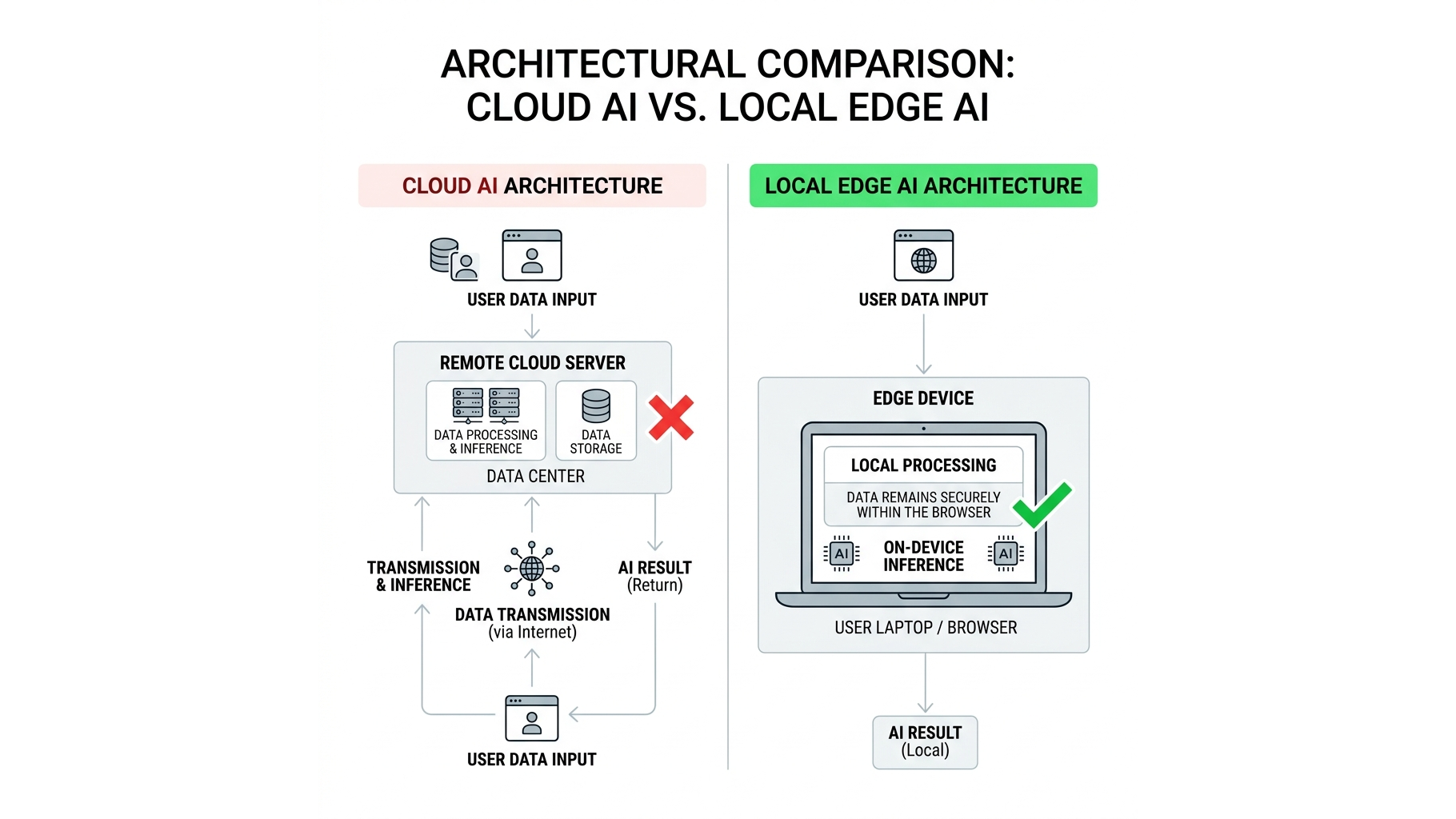
This approach is known as Edge Computing, or more specifically in this context, Edge AI. Here is a technical breakdown of how it works entirely inside your browser:
1. Compiling to WebAssembly (WASM)
To run complex algorithms in a browser, standard JavaScript is often too slow. We utilize a technology called WebAssembly (WASM). WebAssembly allows us to take low-level, high-performance code written in languages like C++ or Rust and compile it into a binary format that runs securely inside your browser at near-native speeds.
2. Loading the ONNX Machine Learning Model
When you navigate to our Background Remover tool, your browser downloads a highly optimized, quantized machine learning model. This model is serialized using the ONNX (Open Neural Network Exchange) format. It has been specifically trained on millions of images for deep alpha matting and highly accurate subject segmentation.
This model is loaded directly into your browser's local memory (RAM). It never touches a remote server once the page has loaded.
3. Local Client-Side Inference via WebGL/WebGPU
When you drag and drop your photo into the Utilva interface, the magic happens. The image data is converted into a multidimensional tensor array. The ONNX Runtime Web framework then executes the machine learning model against this tensor array.
To ensure this happens instantly, the runtime offloads the heavy matrix multiplication required by the neural network directly to your computer's own Graphics Processing Unit (GPU) using WebGL or the newer WebGPU APIs.
Why This Changes Everything For You
Because the entire process—from image ingestion to AI inference to PNG export—happens locally on your device's hardware, it completely eliminates the overhead of cloud computing. This architectural shift provides unparalleled benefits to you as the user:
- Zero Watermarks and Zero Paywalls: Because we don't have to pay for expensive GPU cloud servers to process your images, we don't have to monetize the processing. You get the maximum, full-resolution output completely free. We don't degrade your image to force an upgrade.
- Instantaneous Speed: There is zero upload time. There is zero download time. There is no server queue. As soon as you drop the image, your local GPU tears through the inference, usually resulting in a perfect cutout in milliseconds.
- Absolute 100% Privacy: This is arguably the most important feature. Zero bytes of your image data ever leave your device. There is no network request transmitting your photo. Your files are strictly confined to your local hard drive and your browser's isolated memory sandbox. They are physically incapable of being intercepted, stored, or used as training data by us or anyone else.
Step-by-Step Guide: How to Use the Tool
Using the tool is designed to be as frictionless as possible. You don't need an account, and you don't need to install anything.
- Navigate to the Tool: Open the Background Remover utility in your browser. (We recommend using a modern browser like Chrome, Edge, or Firefox for optimal WebGL performance).
- Drop Your Image: Drag and drop any JPG, PNG, or WebP image directly into the designated drop zone. You can also click the zone to open your file browser.
- Instant Processing: The moment the file is selected, the local ONNX model analyzes the pixels, identifies the primary subject (whether it's a person, a car, a product, or an animal), and generates an alpha mask to erase the background.
- Download: Click the massive export button. Your browser immediately saves the full-resolution, transparent PNG to your downloads folder.
Top Use Cases for Local Edge Removal
While anyone can benefit from a fast, private background remover, we designed this architecture specifically with professional workflows in mind:
E-Commerce and Product Photography
Online store owners frequently need to standardize product imagery against pure white or transparent backgrounds for Shopify or Amazon listings. Uploading batches of unreleased product photos to a third-party server is a security risk. By processing locally, brands can maintain strict embargoes on new products while still benefiting from AI-accelerated workflows.
Content Creators and YouTubers
Creating engaging YouTube thumbnails requires clean cutouts of faces and reaction shots. Creators moving quickly between Premiere Pro and Photoshop don't have time to deal with clunky lasso tools or waiting for cloud uploads. Dropping a screenshot into a browser tab and getting an instant transparent PNG accelerates the thumbnail design process exponentially.
Graphic Designers and Meme Creators
Whether you're compiling assets for a client mood board or just isolating a subject for a viral meme, speed is everything. A local-first web tool behaves like an extension of your operating system, providing the exact asset you need without breaking your creative flow state.
The Future is Local
Removing a background shouldn't require a monthly subscription, it shouldn't force you to compromise the resolution of your imagery, and it certainly shouldn't cost you your privacy. We engineered a solution that respects your time, your wallet, and your data.
The era of relying on centralized cloud servers for basic utility tasks is ending. As edge devices become exponentially more powerful, the browser itself is becoming the ultimate operating system. Try out the local-first Utilva Background Remover for yourself, and experience what the modern, serverless web feels like.
Frequently Asked Questions (FAQ)
Is it safe to use this tool for proprietary product photos?
Absolutely. Because the neural network runs entirely inside your browser's local memory via WebAssembly, your image data is never uploaded to an external server. It is physically impossible for us to intercept or store your files.
Why is the output resolution higher than other free tools?
Traditional cloud tools downscale images to save server GPU processing costs. Since we utilize your device's local GPU for inference, we don't have those server costs, allowing us to give you the full-resolution output.
Does it work on mobile devices?
Yes. Modern mobile browsers support WebGL and WebAssembly, meaning the ONNX model can run natively on iOS and Android. However, performance will depend on your device's chipset.
About the Author: Muhammad
Muhammad is the Lead Engineer at Utilva. As someone who builds side projects constantly, he got so frustrated with "free" tools bait-and-switching him with low-res watermarked downloads that he decided to build his own. Based in Dubai, he runs entirely on extreme amounts of caffeine.